

Print Standards
Print standards focus on clarity, legibility, and proper setup, so your work reproduces as intended across publications. This section walks through logo usage, sizing, file prep, and accessibility considerations to help eliminate surprises during production.
Use these standards when developing print creative for Ad Council campaigns. In most cases, the Ad Council will build final print mechanicals to ensure consistency, quality, and compliance across all placements. Reviewing this section early helps streamline approvals and avoid production issues later.
Reviewing the Print Production Checklist is essential. It ensures all required specs, assets, and paperwork are included and helps avoid delays caused by missing or incomplete materials.
Pro Tip
If your team plans to provide fully built print mechanicals, this must be discussed and approved by your Ad Council campaign manager prior to production.
How Print Production Works
Preferred approach (default):
Agencies provide comps for each unique creative concept, and the Ad Council produces all final print mechanicals in-house for magazines, newspapers, and any required resizes.
Alternate approach (by exception):
If special arrangements are made with your Ad Council campaign team, agencies or partners may provide fully built mechanicals. In these cases, additional specifications apply (see Agency Print Mechanical Specifications below).
To support either approach, please reference the Production Checklist and use the provided templates whenever possible.
Download the Production Checklist
Download INDD Templates (recommended for all agency comps)
Agencies provide comps for each unique creative concept, and the Ad Council produces all final print mechanicals in-house for magazines, newspapers, and any required resizes.
Alternate approach (by exception):
If special arrangements are made with your Ad Council campaign team, agencies or partners may provide fully built mechanicals. In these cases, additional specifications apply (see Agency Print Mechanical Specifications below).
To support either approach, please reference the Production Checklist and use the provided templates whenever possible.
Download the Production Checklist
Download INDD Templates (recommended for all agency comps)
Logo Usage
Magazine and Newspaper Logo Placement
The Ad Council logo must appear on the bottom left, with sponsor logos on the bottom right, equidistant from the bottom margin and aligned parallel to one another. This placement helps prevent logo reconfiguration or removal.
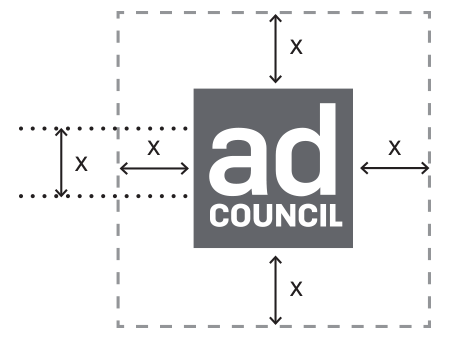
The clearance space around the Ad Council logo should equal the x-height of the logo (the height of the letter “a”).
Positioning with Other Logos
The same x-height clearance must be maintained between the Ad Council logo and all other logos.

Example

The Ad Council logo must appear on the bottom left, with sponsor logos on the bottom right, equidistant from the bottom margin and aligned parallel to one another. This placement helps prevent logo reconfiguration or removal.
- The Ad Council logo must be no smaller than 100% of the sponsor logo
- Minimum Ad Council logo width: .375"
The clearance space around the Ad Council logo should equal the x-height of the logo (the height of the letter “a”).
Positioning with Other Logos
The same x-height clearance must be maintained between the Ad Council logo and all other logos.
Example
Creative Guidelines
Agencies supply one (1) 11.5" w x 21" h, 4-color comp for each unique creative concept.
The Ad Council will:
Download INDD Templates
Using the templates helps ensure proper sizing, margins, and file setup—saving time during production and trafficking.
Newspaper (4C)
In InDesign, all linked or embedded images should have an effective resolution of 300 ppi or higher at 100% of mechanical size.
Only applicable if you have received approval from your Ad Council campaign team to supply fully built print mechanicals.
While the full standards are outlined in a separate document, agencies should pay particular attention to:
The Ad Council will:
- Produce all final mechanicals in-house.
- Create all required magazine and newspaper sizes.
- Handle any necessary resizes.
Download INDD Templates
Using the templates helps ensure proper sizing, margins, and file setup—saving time during production and trafficking.
Required Sizes
Newspaper (4C)
- Bleed: No bleed
- Trim: 11.5" w x 21" h
- Live Area: 11" w x 20.5" h
In InDesign, all linked or embedded images should have an effective resolution of 300 ppi or higher at 100% of mechanical size.
Agency Print Mechanical Specifications (When Supplying Final Mechanicals)
Only applicable if you have received approval from your Ad Council campaign team to supply fully built print mechanicals.
While the full standards are outlined in a separate document, agencies should pay particular attention to:
- Ink density and total ink coverage (see page 4 of the print mechanicals guide)
- CMYK color setup
- Source file structure and naming conventions
- Image resolution and linked assets
- Font usage and embedding
Accessibility
Accessibility refers to how easily people with varying visual, motor, cognitive, or other needs can engage with creative.
The Ad Council is committed to incorporating accessibility best practices across all print campaigns, where possible, to reach more people.
The Ad Council is committed to incorporating accessibility best practices across all print campaigns, where possible, to reach more people.
- Use this online tool to choose colors with strong contrast in hue and value.
- Paragraph text contrast should exceed 4.5:1; title text should exceed 3:1.
- Do not rely on color alone to convey meaning.
- Use easy-to-read fonts; avoid decorative fonts, all caps, and justified text where possible.
- Write URLs and hashtags in CamelCase.
- Aim for language at or below a 6th-grade reading level.
Print Production Checklist
Use this checklist to confirm all required files and forms are included before submission.
Please submit all masters and required forms to your Ad Council Campaign Manager.