

Digital Standards
Digital creative moves fast and these standards are designed to keep pace. This section covers display, HTML5, online video, and accessibility best practices to help your work perform across platforms while meeting Ad Council requirements.
Think of this guide as a practical checklist for building digital units that are optimized, compliant, and easy to traffic.
Reviewing the Digital Production Checklist is essential. It ensures all required specs, assets, and paperwork are included and helps avoid delays caused by missing or incomplete materials.
Pro Tip
Design with accessibility in mind from the start. Building captions, contrast, and legibility into the concept is far easier than retrofitting later.
Web Banners
Web banners are a primary driver of reach in donated digital media. The Ad Council can produce banners in-house from approved creative, or agencies may submit finalized banners with prior coordination. If your team plans to supply final banners, please confirm requirements with your campaign manager and follow the guidance and specs below.
1. Keep the message focused. Banner copy should be short and impactful. Users often glance at banners for only a few seconds.
2. Use a clear CTA. Simple, direct calls to action such as Learn More or Donate Now perform best.
3. Design mobile-first. Prioritize legibility with larger fonts, simplified layouts, and minimal detail.
4. Aim for visual clarity. Use strong contrast, clean layouts, and readable typography. Avoid clutter and low-contrast color combinations.
5. Design at 2x resolution. Creating banners at 2x supports high-density screens and ensures quality when scaling down.
Using standard sizes helps maximize reach and simplifies trafficking. Producing multiple sizes also helps prevent banner fatigue. We recommend refreshing executions annually.
Desktop
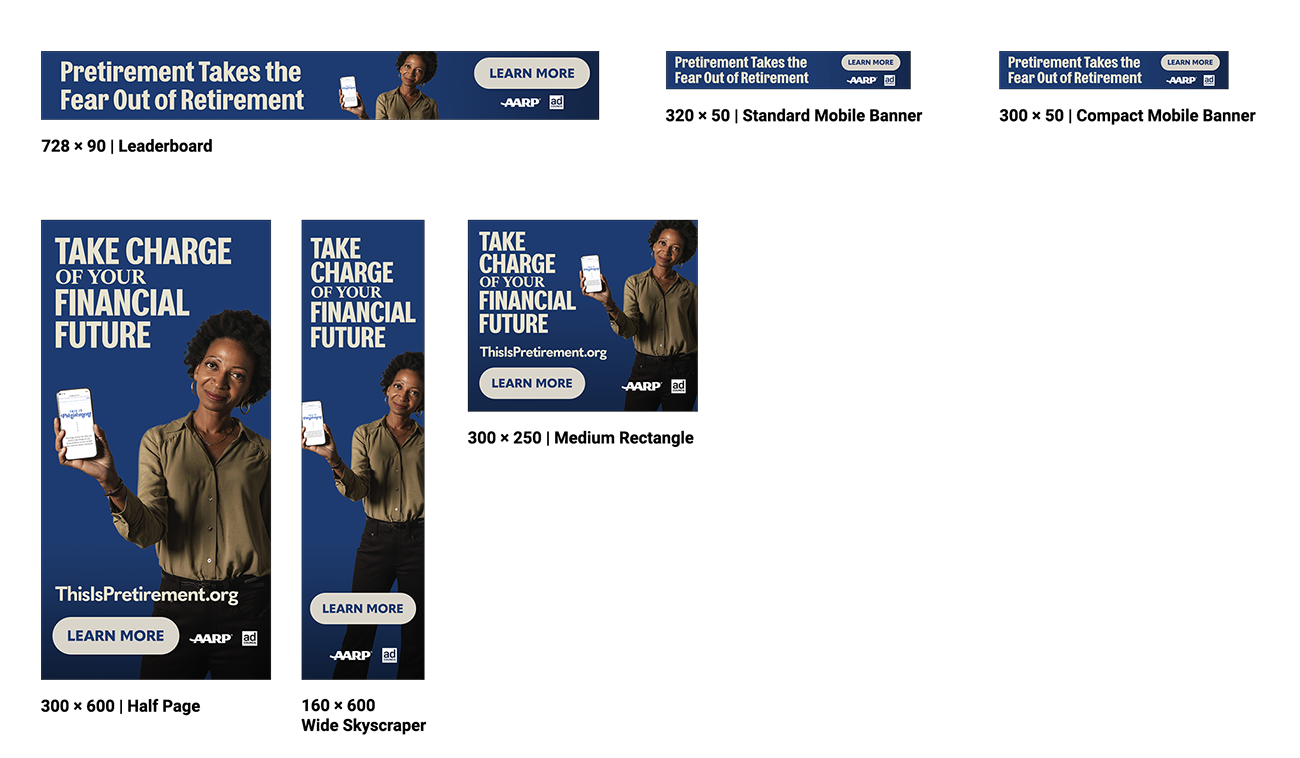
Static Banners
Please provide source files via file-sharing link in a separate folder, including:
Logo requirements can vary by format and placement. Please refer to the Logo Usage section for detailed guidance on logo sizing, clearance space, and positioning relative to sponsor logos.
Creative Guidance
1. Keep the message focused. Banner copy should be short and impactful. Users often glance at banners for only a few seconds.
2. Use a clear CTA. Simple, direct calls to action such as Learn More or Donate Now perform best.
3. Design mobile-first. Prioritize legibility with larger fonts, simplified layouts, and minimal detail.
4. Aim for visual clarity. Use strong contrast, clean layouts, and readable typography. Avoid clutter and low-contrast color combinations.
5. Design at 2x resolution. Creating banners at 2x supports high-density screens and ensures quality when scaling down.
Recommended Sizes
Using standard sizes helps maximize reach and simplifies trafficking. Producing multiple sizes also helps prevent banner fatigue. We recommend refreshing executions annually.
Desktop
- 728 × 90 — Leaderboard
- 300 × 250 — Medium Rectangle
- 300 × 600 — Half Page
- 160 × 600 — Wide Skyscraper
- 320 × 50 — Standard Mobile Banner
- 300 × 50 — Compact Mobile Banner
- 300 × 250 — Mobile Rectangle (in-content)
Specs and Deliverables
Static Banners
- Submit final files as JPG.
- Provide banners at both 1x and 2x dimensions (e.g., 300×250 at 1x and 600×500 at 2x).
- Include source files in PSD or Illustrator format.
- 2x: adc_campaigncode_title_size_language_static_2x.jpg
- 1x: adc_campaigncode_title_size_language_static.jpg
- Package files in a .zip folder.
- The HTML file inside the zip must be named index.html.
- All animated banners should adhere to 1x pixel dimensions.
- Include a static backup end frame (1x JPG) for each execution.
- Organize backup banners outside the zip file in a folder labeled “backups.”
- Animated banner: adc_campaigncode_title_size_language_HTML5.zip
- Backup banner: adc_campaigncode_title_size_language_backup.jpg
Source Files
Please provide source files via file-sharing link in a separate folder, including:
- Design files (PSD or Illustrator)
- Logos (vector format)
- Backgrounds and photos
- Fonts
- Adobe Animate source files (if applicable)
Logo Usage (Reference)
Logo requirements can vary by format and placement. Please refer to the Logo Usage section for detailed guidance on logo sizing, clearance space, and positioning relative to sponsor logos.
Online Video (OLV)
Creative Guidance
When creating video for digital channels, design with mobile viewing in mind. Consider starting with a :06 concept and upsizing to :15 rather than cutting down a TV spot.
1. Design for sound on or off. Use captions, typography, and graphics to communicate the message visually. Do more than simply subtitle the voiceover.
2. Have one clear CTA. Short-form video works best with a single, focused action. Place URLs early, not only on the end frame.
3. Front-load the story. Capture attention within the first three seconds to accommodate scrolling behavior.
4. Plan for flexibility. Shoot and design footage so it can be easily reformatted across multiple aspect ratios.
OLV Specs
Required Deliverables
- Two files per OLV: a master and a generic.
- Formats: H264 MP4 (preferred) or Apple ProRes 422.
- Creative must be full-frame (no letterboxing or pillarboxing).
- Minimum 15 mbps bit rate with constant frame rate and stereo audio.
- Each OLV must include a script and expiration date.
- Follow logo, super, and CTA timing guidelines outlined in the Broadcast TV Specs.
- 16:9, 1:1, 9:16, 4:5
OLV Accessibility
Accessibility ensures video content can be used by people with varying visual, hearing, motor, and cognitive abilities. Check out these Guidelines for Social Media Accessibility if you want more in-depth information.
1. Color & Contrast
- Do not rely on color alone to convey meaning.
- Ensure sufficient contrast (minimum 4.5:1).
- Make text large enough to read on mobile screens.
- Allow text to remain on screen long enough to be fully read.
- Content must not flash more than three times per second.
- Provide SRT caption files for each OLV.
- Position captions so they do not obscure faces or key on-screen text.
- Clearly identify speakers and sound effects.
- Open-text captions and PDF transcripts are strongly recommended.
Digital Accessibility
Accessibility refers to how easily people with varying visual, hearing, motor, and cognitive abilities can access digital media. The Ad Council is committed to incorporating WCAG 2 best practices across all digital creative whenever possible.
All digital formats should:
All digital formats should:
- Use strong color contrast and legible typography.
- Avoid fast-flashing content.
- Include captions or alt text where appropriate.
Digital Production Checklist
Download this checklist to ensure all submitted materials meet Ad Council's specifications.
Please submit all files and required forms to your Ad Council Campaign Manager.